Is there a .m3u playlist and EPG .xml data channel mapper for free?

by saulin74

I know r/ https://www.iptv-epg.com offers EPG data for a subscription but lets say you know some good sources for EPG but the data does not match your playlist.

Are there free tools or apps out there that will allow you to map your channels on the playlist to the correct channel on the EPG data.

Hopefully something with a GUI. I believe there is also WebGrab+Plus but it runs on scripts and would probably take so much time to match your channels to the EPG Data that way.
GoldenRainfall

I use eChanneliser. It allows you to save your output in a number of different file formats - but I believe it's only for Enigma2 STBs.

(Hopefully I understood your question correctly!)

travis-

I have a python script I created that uses webgrabplus to match the tv-id tag in the m3u with whats in the epg and renames the epg to match so it loads fine. Had a batch script and it only ever took ~15 minutes to run. Then the service I used it with went under.

humbertog

WebGrab+Plus is an EPG scrapper, it is the main tool to generate the epg.xml files that most of the IPTV services have, it scrape the data directly from the tv guides websites like yo.tv, tvguide.co.uk and so on, it is not very user friendly but it is an amazing tool.

I think the most reliable way to map your m3u list using iptv-epg.com is to do it manually, I know is pretty time consuming but when is done you will never regret it, just edit your m3u playlist and add this tag:

tvg-name=

With the Channel ID from http://iptv-epg.com/available-channels for example Fox Sports 2 US:

tvg-name="FoxSports2.us"

You can even add a logo with this tag:

tvg-logo="htp://i.imgur.com/logo.png"

The final result should be something like this:

#EXTINF:0 tvg-name="FoxSports2.us" tvg-logo="http://i.imgur.com/logo.png" group-title="",US: Fox Sports 2
http://your-iptv-url.ts

Open your new edited m3u file and now your channel list should work with your EPG data.

I hope this can help you.

n3ddy

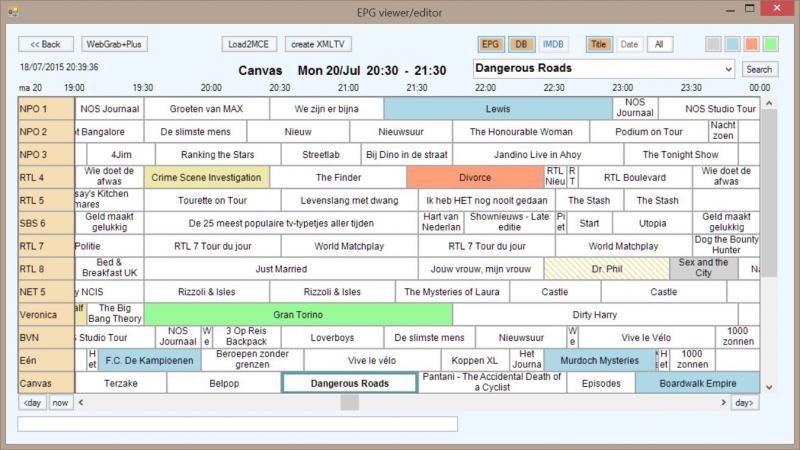
Wegrab is probably the best IMHO - I'm using it (Scripted, on Linux, in Docker) and it works wonderfully - They do have a GUI config tool if you're not too comfortable viewing the EPG Data from the CLI. - http://www.webgrabplus.com/sites/default/files/downloads/Misc/EPGEdit1.4.zip

Screenshot: http://www.webgrabplus.com/sites/default/files/user/WGMaker/1.JPG

saulin74

Big thanks to travis for the zap2xml reference.

I manged to do what I wanted using a few tools and a batch file I created

For this I had to create 3 accounts on tvguide.com and setup my guide preferences on 3 countries and 3 providers that matched the guide for my IPTV service.

echo off
cd\
cd C:\Users\Saulin\Desktop\zap2xml
C:\Users\Saulin\Desktop\zap2xml\zap2xml -z -u user@email.com -p Password -c mx -o mx.xml
C:\Users\Saulin\Desktop\zap2xml\zap2xml -z -u user2@email.com -p Password -c cr -o cr.xml
C:\Users\Saulin\Desktop\zap2xml\zap2xml -z -u user3@email.com -p Password -c us -o usa.xml
rd /s /q C:\Users\Saulin\Desktop\zap2xml\mx
rd /s /q C:\Users\Saulin\Desktop\zap2xml\cr
rd /s /q C:\Users\Saulin\Desktop\zap2xml\us
del C:\Users\Saulin\Desktop\zap2xml\latin.xml /s
del C:\Users\Saulin\Desktop\zap2xml\tvguide.xml /s
del C:\Users\Saulin\Desktop\zap2xml\provider.xml /s
cd\
cd C:\Users\Saulin\Desktop\zap2xml
TVGuideCombine.exe latin.xml cr.xml mx.xml
TVGuideCombine.exe tvguide.xml latin.xml usa.xml
timeout 5
curl http://iptvserver.tv/provider.xml.gz -o provider.xml.gz
timeout 5
gzip -d provider.xml.gz
timeout 5
ftp -s:C:\Users\Saulin\Desktop\zap2xml\ftpscript.txt
timeout 5
exit

This grabs guide from 3 accounts. It only gets the channels you add to your favorites at tvguide.com

I also grab the epg xml from my iptv provider using the command line utility curl.exe in the batch file

It creates 3 separate cache folders for each guide. This is needed. Then I use TVGuideCombine.exe to combine the first 2 guides. Then I use the tool again to combine the first 2 guides with the 3rd guide. The tool can only combine 2 xmls at a time.

The guide from my provider I grab it compressed and then I decompress it with the gzip.exe tool. Then I use the windows built in ftp command line client that uses the commands in ftpscript.txt to upload the files to the proper folder in my web server though ftp :)

Then I just add the guides from the links on my web server to IPTV Extreme Pro.

Now I could also grab the m3u from my IPTV Provider and create a script to replace the lines that I need to replace in the m3u to have the guide working but IPTV Extreme pro does have a feature called alias for each channel that allows you to map the channel to one of the channels on the epg that it has downloaded and that's working fine for me.